Best Smart Locks (2026): 8 Picks for Keypad, Fingerprint, Apple Home Key and Renters
Quick answer
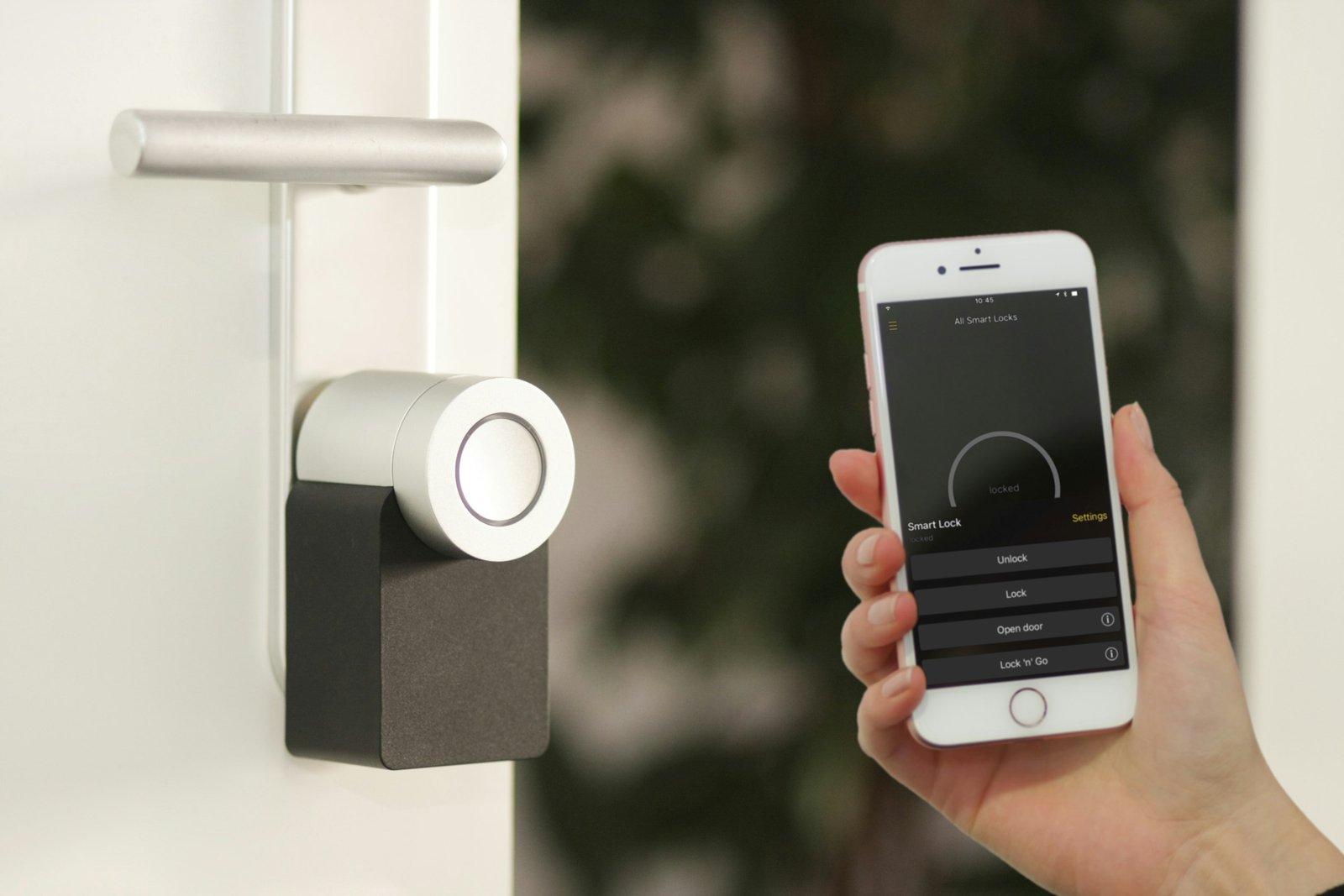
The best smart lock for most front doors is the Schlage Encode: built-in Wi-Fi with no hub, up to 100 access codes, a built-in alarm and a fit range that covers standard US doors. If you want a fingerprint reader without a premium price, the eufy Smart Lock C220 unlocks with a touch and runs about 8 months on 8 AA batteries. Renters who cannot swap the deadbolt should pick the August Wi-Fi Smart Lock, which mounts over the existing thumbturn on the inside and keeps your current key working.
Disclosure: As an Amazon Associate I earn from qualifying purchases.
- Schlage Encode Smart WiFi Deadbolt Best Overall
Built-in Wi-Fi, touchscreen keypad, up to 100 access codes, built-in alarm, fits 1-3/8 to 1-3/4 inch doors.
Check current price on Amazon → - eufy Security Smart Lock C220 Best Fingerprint
Fingerprint unlock in under 1 second, built-in Wi-Fi with no bridge, about 8 months on 8 AA batteries, IP53.
Check current price on Amazon → - August Wi-Fi Smart Lock Best Retrofit for Renters
Fits over most single cylinder deadbolts on the inside of the door, so your key and exterior hardware stay the same.
Check current price on Amazon →

A smart lock solves small daily problems: no more hiding a key under the mat, no more driving back to check whether you locked up, and no more copying keys for the dog walker. The tricky part is that “smart lock” covers very different products. Some replace your whole deadbolt, some clip over the inside thumbturn, some need a hub to reach the internet, and some only make sense inside one phone ecosystem. Finding the best smart lock starts with your door and your phone, not the feature list.
This guide compares eight smart locks on Amazon across every common setup: a premium Wi-Fi deadbolt, a keypad deadbolt that pairs with Apple Watch, a budget-friendly fingerprint lock, an Apple Home Key lock with hands-free UWB unlocking, a Matter over Thread fingerprint lock, a retrofit lock that keeps your key, a nearly invisible premium lock and a budget Wi-Fi keypad. Every battery, fit and compatibility spec comes from the product listings, and where a listing does not say something, we write “not stated” instead of guessing.
You also get a lock type table (keypad, fingerprint, retrofit, Wi-Fi vs Bluetooth and hub), a door compatibility checklist with backset, bore and thickness measurements, renter options, a battery and lockout backup plan, security tips, install steps and an FAQ. Pairing a lock with a camera? Our best video doorbells guide covers the doorbell side, and our best smart thermostats roundup handles heating and cooling.
Best smart lock comparison table
All facts come from the Amazon listings. “Built-in Wi-Fi” means the lock reaches the internet without a separate bridge or hub. Tier words (budget-friendly, mid-range, premium) are our rough guide; check the current price on Amazon. Use the table to shortlist the best smart lock for your door, then read the matching pick below.
| Pick | Lock type | Ways to unlock | Remote access | Power (listed) | Works with | Tier |
|---|---|---|---|---|---|---|
| Schlage Encode Smart WiFi Deadbolt | Full deadbolt replacement | Touchscreen code (up to 100), app, voice, key | Built-in Wi-Fi | 4 AA, up to 6 months | Alexa, Google Home | Premium |
| Yale Assure Lock 2 Wi-Fi Keypad | Full deadbolt replacement (keyed) | Keypad, app, Apple Watch, Auto-Unlock, voice, key | Wi-Fi (2.4 GHz only) | Not stated in the listing | Yale Access app; voice (assistants not named) | Mid-range |
| eufy Smart Lock C220 | Full deadbolt replacement | Fingerprint, keypad, app, Apple Watch, voice, key | Built-in Wi-Fi, no bridge | 8 AA, about 8 months | Alexa, Google Assistant | Budget-friendly |
| Aqara Smart Lock U400 | Full deadbolt replacement | UWB hands-free, Apple Home Key, fingerprint, code, NFC card, app, voice, key | Matter over Thread (needs a Thread hub) | Rechargeable battery, up to 6 months | Apple Home, Alexa, Google, Home Assistant | Premium |
| ULTRALOQ Bolt SE | Full deadbolt replacement | Fingerprint (50), codes (50), app, eKeys, voice, 2 keys | Built-in Wi-Fi or Matter over Thread | Up to 18 months (Thread) | Apple Home, Alexa, Google | Mid-range |
| August Wi-Fi Smart Lock | Retrofit (inside only) | App, Auto-Unlock, voice, your existing key | Built-in Wi-Fi | Not stated in the listing | Alexa, Google Assistant, Apple HomeKit, SmartThings | Mid-range |
| Level Lock Pro | Hidden deadbolt (looks like a regular lock) | Apple Home Key, NFC fobs, touch-to-unlock, voice, key | Matter hub or Level Connect bridge (sold separately) | Not stated in the listing | Apple Home, Google Home, Alexa, SmartThings | Premium |
| Tapo DL100 | Full deadbolt replacement | Tactile keypad (up to 200 codes), app, Bluetooth, voice with PIN, 2 keys | Built-in Wi-Fi | 4 AA, up to 200 days Wi-Fi / 300 days Bluetooth | Tapo app; voice with PIN (assistants not named) | Budget-friendly |
The 8 best smart locks, by door and setup
Each pick earns its place for a specific door, phone or living situation. Facts come from the listings; the badges are our judgment based on those facts and the compatibility rules later in this guide.
1. Schlage Encode Smart WiFi Deadbolt (Century Trim): Best Overall
For most homeowners, this is the best smart lock to start with because it does everything on its own: Wi-Fi is built in, so there is no bridge to buy, and the Schlage Home app lets you lock and unlock from anywhere, manage up to 100 access codes, view lock history and get custom notifications. It works with Alexa and Google Home for voice control, and the exterior has a fingerprint-resistant touchscreen keypad with one-touch locking when you leave.
Security is where it stands out. The listing describes an encrypted connection, a built-in alarm that reacts to door movement and forced entry attempts, and a BHMA certification at the highest residential rating for security, durability and finish. Install takes a screwdriver and no hardwiring, and the Snap ‘n Stay design holds the lock on the door while you work. It fits doors 1-3/8 to 1-3/4 inches thick with a 2-3/8 or 2-3/4 inch backset, which covers most US exterior doors. Four AA batteries are included and last up to six months with typical use, with low-battery warnings on the touchscreen and in the app, plus one physical backup key. Apple Home and fingerprint unlock are not listed.
- Built-in Wi-Fi, no hub
- Up to 100 access codes
- Built-in forced-entry alarm
- Auto-lock with adjustable delay
- No fingerprint reader
- Apple Home support not stated
Best for: Homeowners who want a set-and-forget best smart lock for front door use with Alexa or Google Home
Check current price on Amazon →2. Yale Assure Lock 2 Keyed Deadbolt with Wi-Fi and Keypad: Best Keypad Deadbolt
If your household mostly wants codes instead of keys, the Yale Assure Lock 2 is our pick for the best keypad deadbolt. Everyone can choose their own way in: the keypad, a voice assistant, Auto-Unlock as you approach, or the Yale Access app on a phone or Apple Watch. The lock replaces the deadbolt on most standard US entry doors with just a screwdriver, and Yale says no DIY experience is required.
DoorSense is the useful extra. Once it detects that the door is actually closed, Auto-Lock can secure it, so you never wonder whether you locked up. From the app you can lock, let someone in, get notifications and share access from anywhere. Two limits to note from the listing: it works only on 2.4 GHz Wi-Fi, and only in the US and Canada. Battery type and life are not stated on this listing, so check the product details before you buy. This keyed version keeps a key cylinder as a backup.
- Keypad, app, Apple Watch and Auto-Unlock
- DoorSense confirms the door is closed
- Screwdriver install
- Keyed backup cylinder
- 2.4 GHz Wi-Fi only
- Battery details not stated in the listing
Best for: Families who share codes, iPhone and Apple Watch users who like hands-free Auto-Unlock
Check current price on Amazon →3. eufy Security Smart Lock C220 (Fingerprint): Best Fingerprint
A fingerprint reader is the fastest way through your own door, and the eufy C220 brings it to a budget-friendly tier. The listing quotes unlocking in less than one second, and the self-learning recognition gets more precise with each touch. You also get the eufy Security app, a keypad, a physical key, Apple Watch unlock and voice control through Alexa or Google Assistant, so guests and kids without enrolled fingers still have a way in.
Wi-Fi is built in with no bridge, and if you already own a eufy doorbell, the lock joins the same app for routines. Eight AA batteries run around 8 months depending on use. It fits most standard deadbolts and bores under 54 mm once you remove the spacer, with a 15-minute install and no drilling. The lock is BHMA Grade 3 certified after more than 100,000 lock and unlock cycles, sends an alarm on unusual open attempts, is rated IP53 and lists an operating range of -22 to 158°F, which matters on a sun-baked or freezing front door.
- Fingerprint unlock in under 1 second
- Built-in Wi-Fi, no bridge
- About 8 months per set of batteries
- Wide -22 to 158°F operating range
- Uses 8 AA batteries
- BHMA Grade 3 rather than Grade 1
Best for: Busy households, kids and anyone who wants fingerprint entry at a budget-friendly tier
Check current price on Amazon →4. Aqara UWB Smart Lock U400 (Apple Home Key): Best for Apple Home Key
For iPhone homes, this is the smart lock Apple Home Key fans have been waiting for. Tap your iPhone or Apple Watch to unlock, or let UWB (Ultra-Wideband) handle it: the lock detects your presence, direction and intent and unlocks as you walk up, with no tap at all. The requirements are specific, so check them: UWB needs a Thread-enabled Apple Home hub, Apple Watch Series 6 or later (not SE) on watchOS 11.5+, or iPhone 11 or later (not iPhone SE or iPhone 16e) on iOS 18.5+. Home Key tap-to-unlock needs a HomePod (2nd Gen), HomePod mini or Apple TV 4K (2021/2022).
It is not Apple-only. Matter over Thread lets it join multiple platforms at once, including Alexa, Google and Home Assistant, each with its own Thread-enabled Matter controller. Other ways in include fingerprint, a touchscreen passcode, voice, the app, an NFC card (sold separately) and a physical key. Power comes from a removable rechargeable lithium battery rated up to 6 months per charge; you can charge through the USB-C port without taking the lock offline, and a voice alert warns below 20%. It is BHMA certified, IP65 rated, rekeyable and adds Night Latch and Do Not Disturb modes in the Aqara app.
- Apple Home Key plus UWB hands-free unlock
- Matter over Thread for multiple ecosystems
- Rechargeable battery with USB-C
- IP65 and rekeyable cylinder
- Needs a Thread hub for its best features
- UWB has strict iPhone and Watch requirements
Best for: iPhone and Apple Watch households that want the newest hands-free entry
Check current price on Amazon →5. ULTRALOQ Bolt SE Wi-Fi Smart Lock (Matter over Thread): Best Matter Smart Lock
The ULTRALOQ Bolt SE gives you two paths to the internet. Built-in Wi-Fi (2.4 GHz only, router within 70 feet) works without any hub, and Matter over Thread connects it to Apple Home, Alexa, Google and other Matter apps through a Thread border router. That makes it a flexible mid-range pick if you are not sure which smart home platform you will settle on.
The listing counts seven ways in: up to 50 fingerprints, up to 50 passcodes, the smartphone app, a web portal, shareable eKeys and codes, voice through Siri, Alexa or Google Assistant, and two mechanical keys. You can share permanent, scheduled or temporary access and check activity history. On Thread, battery life is rated up to 18 months, the longest in this guide. Auto-lock runs on a timer, or you press the ULTRALOQ button to lock instantly. Note that a door sensor is not included, so the lock cannot tell you the door is ajar on its own.
- Wi-Fi or Matter over Thread
- Up to 50 fingerprints and 50 codes
- Up to 18 months battery on Thread
- Web portal and eKeys for guests
- Door sensor not included
- Matter features need a Thread border router
Best for: Mixed-ecosystem homes, Airbnb-style guest access, people who hate changing batteries
Check current price on Amazon →6. August Wi-Fi Smart Lock (Retrofit): Best Retrofit for Renters
If you rent or simply like your current hardware, a retrofit lock is the easiest upgrade, and the August Wi-Fi Smart Lock is the best smart lock for renters in this guide. It mounts on the inside of the door over most single cylinder deadbolts and is not much bigger than the original thumbturn. Nothing changes outside: your key still works, the exterior looks the same, and when you move out you put the old thumbturn back.
August lists an install time of about 10 minutes. Built-in Wi-Fi connects it to Amazon Alexa, Google Assistant, Apple HomeKit, Samsung SmartThings and more, with no separate bridge. Auto-Unlock opens the door as you arrive home (optional), and Auto-Lock with DoorSense secures it once the door is closed or after a set time. You can share permanent, scheduled or temporary access in the August app. A keypad is not part of this listing and battery type and life are not stated, so plan on the app and your existing key as the main ways in.
- Keeps your existing key and exterior
- About 10 minute install
- Works with Alexa, Google, HomeKit, SmartThings
- Easy to reverse at move-out
- No keypad in this listing
- Battery details not stated
Best for: Renters, condo owners with HOA rules on exterior hardware, anyone who wants to keep their keys
Check current price on Amazon →7. Level Lock Pro (Matter, Apple Home Key): Best Premium Invisible Lock
Level takes the opposite approach to every other lock here: the technology hides inside the door, so from the outside and inside it looks like a traditional deadbolt. The listing says it is 62% smaller than other smart locks, with no bulky interior or exterior hardware. It still packs door status detection with built-in sensors (no stick-on magnets), Apple Home Key and Matter.
Ways in include Apple Home Key on iPhone or Apple Watch, NFC key fobs, touch-to-unlock, voice control and a physical key. It works locally over Bluetooth, and remotely with Apple Home, Google Home, Alexa and SmartThings through a supported Matter hub and Thread border router; remote access in the Level Home app needs a Matter hub or the Level Connect Wi-Fi Bridge, sold separately. Security credentials are strong: BHMA AAA and ANSI Grade 1/A, a bump- and pick-resistant cylinder, end-to-end encryption and a 2-year limited warranty. There is no keypad on the lock itself, and battery details are not stated.
- Looks like a normal deadbolt
- BHMA AAA and ANSI Grade 1/A
- Built-in door status detection
- Apple Home Key and Matter
- Remote access needs a hub or bridge (sold separately)
- No built-in keypad
Best for: Design-focused homes and anyone who wants the most discreet premium smart lock
Check current price on Amazon →8. Tapo Smart Wi-Fi Deadbolt DL100: Best Budget-Friendly
The Tapo DL100 covers the basics well at a budget-friendly tier. Its tactile, backlit keypad stores up to 200 custom codes, and you can hide your real code between random digits so smudges and onlookers give nothing away. You can also unlock with Bluetooth nearby, remotely over Wi-Fi in the Tapo app, by voice with PIN verification, or with the two backup keys in the box.
Battery life is clearly stated: four AA batteries (included) last up to 200 days in Wi-Fi mode or 300 days in Bluetooth mode, and a USB-C port supplies emergency power if they die. Auto-lock runs on custom intervals, and a PIN attempt limiter locks the keypad after a set number of failed tries. The app shows door status, real-time alerts and timestamped activity by user group. The listing title adds IP54 weatherproofing and BHMA Grade 3 certification.
- Up to 200 codes with random-digit masking
- USB-C emergency power
- PIN attempt limiter
- Up to 300 days on Bluetooth mode
- No fingerprint reader
- BHMA Grade 3
Best for: First apartments you own, rentals you manage, and anyone who wants a dependable keypad on a tight budget
Check current price on Amazon →Smart lock types: keypad, fingerprint, retrofit and more
Before comparing brands, decide which kind of lock fits your door and your household. The type decides how you install it, what stays on the outside of the door and how guests get in. Most people shopping for the best smart lock end up choosing between a full keypad deadbolt and a retrofit that keeps their key.
| Lock type | How it works | Best for | Watch out for | Picks here |
|---|---|---|---|---|
| Keypad deadbolt | Replaces the whole deadbolt; enter a code on the outside | Families, guests, dog walkers, short-term rentals | Codes can be shared too freely; worn buttons can hint at digits | Yale Assure Lock 2, Tapo DL100, Schlage Encode |
| Fingerprint deadbolt | Replaces the deadbolt; a sensor reads enrolled fingers | Kids, busy hands, people who forget codes | Wet, cold or injured fingers may need a backup code | eufy C220, ULTRALOQ Bolt SE, Aqara U400 |
| Retrofit lock | Mounts over the inside thumbturn; outside key and hardware stay | Renters, HOA rules, anyone keeping their keys | No outdoor keypad unless sold separately | August Wi-Fi Smart Lock |
| Hidden or invisible lock | Electronics sit inside the bolt; looks like a normal deadbolt | Design-first front doors | Usually needs a bridge or hub for remote access | Level Lock Pro |
| Phone or watch key (Apple Home Key, UWB) | Tap or walk up with an iPhone or Apple Watch | Apple households | Needs a compatible home hub and recent devices | Aqara U400, Level Lock Pro |
Wi-Fi vs Bluetooth vs Thread: how a smart lock connects
Connection type decides whether you can lock the door from work, how long the batteries last and whether you need extra hardware. Many locks combine two radios: Bluetooth for quick unlocking up close, and Wi-Fi or Thread for remote control.
| Connection | Remote access | Extra hardware | Battery impact | Good to know |
|---|---|---|---|---|
| Built-in Wi-Fi | Yes, from anywhere through the app | None | Highest drain of the three | Most locks need 2.4 GHz Wi-Fi; place the router within range of the door |
| Bluetooth only | No, only within phone range | None | Lowest drain | Add a Wi-Fi bridge later if the brand sells one |
| Bluetooth plus Wi-Fi bridge | Yes, through the bridge | Plug-in bridge near the door | Low drain on the lock | Bridge must sit within Bluetooth range of the lock |
| Matter over Thread | Yes, through your smart home app | Thread border router (for example a recent HomePod, Apple TV or other Matter hub) | Low drain; ULTRALOQ lists up to 18 months | Works across Apple Home, Google Home, Alexa and SmartThings |
A simple rule: if you never want to think about hubs, choose built-in Wi-Fi like the Schlage Encode, eufy C220, Tapo DL100 or August Wi-Fi. If you already own a Thread border router, a Matter over Thread lock like the ULTRALOQ Bolt SE or Aqara U400 usually gives longer battery life and a faster response.
Door compatibility checklist: backset, bore and thickness
Most returns happen because the lock does not fit the door. Measure before you order. You need a tape measure, a few minutes and the door open. Here are the standard US measurements most deadbolt-replacement smart locks expect, with the Schlage Encode listing as a real example.
| Measurement | How to measure | Common US standard | Example from the listings |
|---|---|---|---|
| Door thickness | Measure the edge of the open door, face to face | 1-3/8 to 1-3/4 inches | Schlage Encode fits 1-3/8 to 1-3/4 inch doors |
| Backset | From the door edge to the center of the deadbolt hole | 2-3/8 or 2-3/4 inches | Schlage Encode supports both |
| Cross bore (face hole) | Diameter of the big hole through the door face | 2-1/8 inches (about 54 mm) | eufy C220 fits bores under 54 mm by removing a spacer |
| Edge bore | Diameter of the hole in the door edge for the bolt | 1 inch | Not stated on most listings; check the install guide |
| Lock style | Look at the inside: thumbturn only, or a key on both sides? | Single cylinder deadbolt | August retrofit fits most single cylinder deadbolts |
- Check bolt alignment. Lock the current deadbolt with the door closed. If you have to push or lift the door for the bolt to slide, fix the strike plate first; a motorized bolt will jam or drain batteries.
- Mortise locks are different. A tall rectangular lock body inside the door (common on older city apartments) does not fit most standard smart deadbolts.
- Double cylinder deadbolts (key on both sides) usually need a full replacement, not a retrofit.
- Handle sets. If your deadbolt is part of a one-piece handle set, confirm the smart lock trim will clear the handle.
- Wi-Fi at the door. Check signal on your phone while standing at the door. ULTRALOQ, for example, asks for the router within 70 feet.
Best smart lock for renters: options that leave no trace
Renters have two good paths. The first is a retrofit lock like the August Wi-Fi Smart Lock, which only replaces the inside thumbturn; the outside cylinder and your landlord’s key stay exactly as they were. The second is a full smart deadbolt installed with permission, keeping the original lock in a labeled bag so you can swap it back at move-out. Either way, the best smart lock for renters is the one your lease allows, so ask in writing first.
- Read the lease. Many leases require landlord access to every lock. Offer to share a permanent code or app access with the property manager.
- Keep every original part. Screws, thumbturn, strike plate and keys go into one bag with the date.
- Avoid drilling. Most deadbolt-replacement smart locks are designed for standard deadbolt holes; the eufy C220 listing specifically says no drilling, and the Schlage Encode and Yale Assure Lock 2 listings say a screwdriver is all you need.
- Check your policy. Some insurers ask about locks and security devices; our renters insurance cost guide explains what changes your premium.
- Moving soon? Add the lock to your first apartment checklist and budget for it with our apartment move-in costs breakdown.
Smart lock Apple Home Key: what you need
Apple Home Key turns your iPhone or Apple Watch into a key you tap on the lock, much like a transit card. A smart lock Apple Home Key setup needs three things: a lock that lists Home Key support (the Aqara U400 and Level Lock Pro here), a recent iPhone or Apple Watch, and an Apple home hub. The Aqara listing names the hub options for tap-to-unlock: HomePod (2nd Gen), HomePod mini or Apple TV 4K (2021/2022).
UWB hands-free unlocking on the Aqara U400 goes a step further: no tap at all, the door unlocks as you approach. It needs a Thread-enabled Apple Home hub plus Apple Watch Series 6 or later (excluding SE) on watchOS 11.5+ or iPhone 11 or later (excluding iPhone SE and iPhone 16e) on iOS 18.5+. If your devices are older, the August Wi-Fi Smart Lock and ULTRALOQ Bolt SE still work with Apple Home and Siri, just without the tap-to-unlock key.
Best smart lock for front door: what matters outdoors
A front door takes sun, rain, cold and the occasional shove, so the best smart lock for front door duty needs more than a nice app. Look at three things on the listing: a certification grade, a weather rating and an operating temperature range.
- BHMA/ANSI grade. Grade 1 is the highest residential and light commercial rating, Grade 3 is the basic residential level. The Level Lock Pro lists BHMA AAA and ANSI Grade 1/A; the Schlage Encode lists the highest residential BHMA rating; the eufy C220 and Tapo DL100 list Grade 3.
- Weather rating. IP65 (Aqara U400) resists dust and water jets; IP54 (Tapo DL100) and IP53 (eufy C220) resist splashing and light rain. A covered porch helps any lock.
- Temperature. The eufy C220 lists -22 to 158°F. Most other listings here do not state a range, so in very cold climates keep a key or a code backup handy.
- Alarms and alerts. Forced-entry alarms (Schlage Encode, eufy C220) and door status sensors (Level Lock Pro, Yale DoorSense) tell you when something is wrong, not just whether the bolt is thrown.
- Camera pairing. eufy and Aqara locks integrate with their own doorbells; see our video doorbell picks to match the brand.
Battery life and lockout backup plan
Every smart lock in this guide runs on batteries, and a dead battery is the number one way people get locked out. Here is what each listing states, followed by a simple backup plan.
| Pick | Power source | Listed battery life | Backup entry |
|---|---|---|---|
| Schlage Encode | 4 AA (included) | Up to 6 months | 1 physical key; low-battery alert on lock and app |
| Yale Assure Lock 2 | Not stated in the listing | Not stated | Keyed cylinder |
| eufy C220 | 8 AA | About 8 months | Physical key |
| Aqara U400 | Removable rechargeable lithium, USB-C | Up to 6 months per charge | Physical key; voice alert below 20% |
| ULTRALOQ Bolt SE | Not stated in the listing | Up to 18 months on Thread | 2 mechanical keys; low-battery alerts |
| August Wi-Fi | Not stated in the listing | Not stated | Your existing key |
| Level Lock Pro | Not stated in the listing | Not stated | Physical key |
| Tapo DL100 | 4 AA (included) | Up to 200 days Wi-Fi, 300 days Bluetooth | 2 backup keys; USB-C emergency power |
- Replace at the first warning. Do not wait for the lock to stop. Swap all batteries at once with fresh ones from the same pack.
- Stash a key outside your home. Give a spare to a trusted neighbor or family member, or keep one in your car. Never under the doormat.
- Know the emergency power option. The Tapo DL100 has a USB-C port for emergency power, and the Aqara U400 charges over USB-C; keep a phone power bank and cable in your car or bag.
- Turn on low-battery notifications in the app, and check them after cold snaps, which drain batteries faster.
- Set a calendar reminder at about 80% of the listed battery life so you change batteries on your schedule, not the lock’s.
Smart lock security tips that actually matter
A smart lock is only as secure as the account that controls it. The U.S. Cybersecurity and Infrastructure Security Agency (CISA) recommends long, unique passwords and multifactor authentication for online accounts, and those two steps protect a lock app more than any feature on the box.
- Use a strong, unique password for the lock app; CISA’s strong password guidance suggests at least 16 characters and a password manager.
- Turn on multifactor authentication wherever the app offers it, following CISA’s MFA advice.
- Install firmware and app updates promptly; CISA’s update software page explains why updates close security holes.
- Give each person their own code so the activity log shows who came in, and delete codes the day a contractor or sitter finishes.
- Use scheduled or temporary access for cleaners and guests instead of a permanent code (Schlage, Yale, ULTRALOQ, August and Tapo all list access sharing).
- Hide your code. The Tapo DL100 lets you type random digits around your real code, and wiping the keypad now and then removes smudge clues.
- Turn on auto-lock and forced-entry alarms where available.
- Secure your Wi-Fi with a strong router password, since a Wi-Fi lock is part of your home network.
How to install a smart lock, step by step
Most smart locks install with a screwdriver in under an hour. Read the brand’s printed guide first, because cable routing and the position of the motor housing differ by model.
Full deadbolt replacement (about 15 to 45 minutes)
- Measure door thickness, backset and bore using the checklist above.
- With the door open, unscrew the inside thumbturn, pull out the exterior cylinder and remove the bolt and strike plate screws.
- Set the backset on the new latch if it adjusts (2-3/8 or 2-3/4 inch), and slide it into the edge bore with the correct side facing up.
- Feed the exterior keypad or fingerprint unit’s cable under the latch and through the bore, then fit the interior mounting plate.
- Connect the cable to the interior unit, attach it and tighten the screws evenly without over-tightening.
- Install the batteries, then run the calibration or door-handing step in the app.
- Close the door and test the bolt several times. If it rubs, adjust the strike plate before you finish.
- Add codes or fingerprints, enable auto-lock and test the physical key last.
Retrofit lock (about 10 to 20 minutes)
- Confirm you have a single cylinder deadbolt with a thumbturn on the inside.
- Remove the two screws holding the inside thumbturn and keep the parts in a labeled bag.
- Attach the retrofit mounting plate with the supplied adapter for your deadbolt brand.
- Clip the smart lock body onto the plate, insert the batteries and pair it with the app.
- Calibrate DoorSense or the door sensor if included, then test from inside and with your key from outside.
Best keypad deadbolt vs fingerprint vs retrofit: quick decision guide
| If you… | Choose | Why |
|---|---|---|
| Share the door with kids, sitters or guests | Keypad deadbolt (Yale Assure Lock 2, Tapo DL100) | Codes are easy to give, schedule and delete |
| Hate typing codes and fumbling for keys | Fingerprint lock (eufy C220, ULTRALOQ Bolt SE) | One touch unlocks; codes still work for guests |
| Rent or want to keep your key | Retrofit (August Wi-Fi Smart Lock) | Inside-only install, easy to undo |
| Live in an Apple home | Apple Home Key lock (Aqara U400, Level Lock Pro) | Tap or walk up with iPhone or Apple Watch |
| Want no hub, ever | Built-in Wi-Fi (Schlage Encode, eufy C220, Tapo DL100, August) | Remote access straight out of the box |
| Care most about looks | Level Lock Pro | All the tech hides inside the door |
What to check before buying the best smart lock for you
- Your door thickness, backset and bore match the listing.
- You have a single cylinder deadbolt (or are ready to replace a double cylinder or mortise lock).
- Your Wi-Fi reaches the door on 2.4 GHz, or you own the hub or Thread border router the lock needs.
- The lock works with your phone and voice assistant (Alexa, Google Home, Apple Home or Matter).
- There is a physical key or emergency power option, and you know where the spare key lives.
- Your lease or HOA allows the change.
- The finish matches your handle set, since most picks come in several finishes.
Still unsure? The Schlage Encode remains the safest all-round best smart lock choice, and the August Wi-Fi Smart Lock is the easiest to undo later.
Check current price on Amazon →
How we chose the best smart lock picks (not tested)
We did not test these smart locks hands-on. We started with real searches from US shoppers about smart locks, keypad deadbolts, fingerprint locks and Apple Home Key, then picked well-known candidates from Amazon’s smart lock category across the Schlage, Yale, August, Level, eufy, Aqara, ULTRALOQ and Tapo lines. We read each listing for lock type, ways to unlock, connection and hub needs, battery life, door fit, certification grade and weather rating, and kept one strong pick for each common setup. Badges are our judgment from those facts. Listings change, so confirm the current details on Amazon before you buy. Watching for holiday sales? Our Black Friday home deals guide explains how to judge a smart home discount, and Philips Hue vs Govee covers lighting that can turn on when you unlock.
Helpful resources: CISA: Use strong passwords, CISA: Turn on multifactor authentication and CISA: Update software.
Smart lock FAQ
What is the best smart lock overall?
For most homes the best smart lock is the Schlage Encode Smart WiFi Deadbolt: built-in Wi-Fi with no hub, up to 100 access codes, a built-in forced-entry alarm and a fit range of 1-3/8 to 1-3/4 inch doors with 2-3/8 or 2-3/4 inch backsets. Four AA batteries last up to six months.
What is the best smart lock for front door use?
The best smart lock for front door use combines a strong certification, weather resistance and an alarm. The Schlage Encode lists the highest residential BHMA rating and a forced-entry alarm, the Aqara U400 is IP65 rated, and the eufy C220 lists an operating range of -22 to 158°F.
What is the best smart lock for renters?
The best smart lock for renters is a retrofit model like the August Wi-Fi Smart Lock. It replaces only the inside thumbturn on most single cylinder deadbolts, keeps your existing key and exterior hardware, and installs in about 10 minutes. Ask your landlord first and keep the original parts.
What is the best keypad deadbolt?
The Yale Assure Lock 2 with Wi-Fi is our pick for the best keypad deadbolt, with keypad, app, Apple Watch and Auto-Unlock entry plus DoorSense auto-lock. On a tighter budget, the Tapo DL100 stores up to 200 codes and lasts up to 200 days on Wi-Fi or 300 days on Bluetooth with 4 AA batteries.
Which smart lock works with Apple Home Key?
In this guide, the Aqara U400 and the Level Lock Pro support Apple Home Key. A smart lock Apple Home Key setup also needs an Apple home hub; the Aqara listing names HomePod (2nd Gen), HomePod mini or Apple TV 4K (2021/2022). The Aqara U400 adds UWB hands-free unlocking with recent iPhone and Apple Watch models.
What happens if a smart lock battery dies?
Every pick here has a physical key backup, and most warn you in the app or on the lock well before the battery runs out. The Tapo DL100 also has a USB-C port for emergency power, and the Aqara U400 recharges over USB-C. Replace batteries at the first low-battery alert.
Also Explore
Latest Posts
 7 Best Christmas Stocking Holders for Every Mantel (2026)
 Best Hanging Toiletry Bag for Women (2026): 8 Organized Picks for Travel and Cruises
 Best Butter Dish with Lid (2026): 8 Picks for Counter and Fridge
 Best Luxury Nail Polish Gift Set: 7 Picks for Christmas (2026)
 Best Boot Tray for Winter (2026): 8 Picks for Snowy, Muddy Entryways
 Best Watch Winder for Automatic Watches (2026): 7 Quiet Picks and a Gift Guide for Him


